





Great store. Will be my favorite in the future. Sent quickly. All items are brand new sealed. And the prices are very nice. Separately, I want to thank Álex Guerra, who controlled my order from start to finish. In general, you are great!!
Thank you for the service. Absolutely top
Great comms. Very helpful and reliable all along
Order placed packaged well, dispatch and delivered promptly Would use again. Thank you
42/5000 the best team, both human and technical
-
 Cómo detectar y cambiar un latiguillo de fibra óptica: caso práctico
Aprende a localizar un fallo en un latiguillo de fibra óptica, qué revisar antes de sustituirlo, cómo elegir el recambio y cómo comprobar que la instalación vuelve a funcionar.
-
 Cómo instalar una antena Dinova en una caravana o autocaravana paso a paso
Aprende a instalar una antena TDT Dinova en una caravana o autocaravana: material, soporte, alimentación, orientación, comprobaciones y errores frecuentes.
-
 Comelit Ultra: qué ofrece esta gama de videoporteros y cuándo elegirla
Descubre qué ofrece Comelit Ultra, qué módulos existen, en qué se diferencia de una solución básica y cuándo tiene sentido para una vivienda, comunidad o edificio.
-
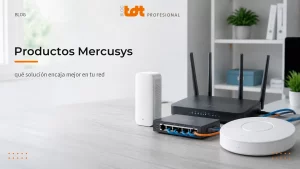 Mercusys: qué es, si es buena marca y qué solución WiFi elegir
Mercusys es una marca especializada en equipos de conectividad para hogares y pequeñas oficinas. Su catálogo incluye routers WiFi, repetidores, sistemas WiFi Mesh Halo, dispositivos 4G y 5G, adaptadores, soluciones Powerline y switches. La marca suele [...]
-
 Cómo conseguir mejor cobertura WiFi según tu casa, negocio o instalación
La mala cobertura WiFi no siempre significa lo mismo. En una vivienda puede aparecer en una habitación lejana, en una planta superior o en una zona con muchos obstáculos. En un negocio o una pequeña oficina, [...]
-
 Cómo configurar un TP-Link TL-WA854RE con el ordenador y sin WPS
Cuando un router no tiene botón WPS o la vinculación automática no funciona, todavía es posible configurar un repetidor WiFi desde el ordenador. Ese es precisamente el caso de muchos usuarios que buscan cómo poner en [...]
-
 Cómo instalar un repetidor WiFi paso a paso y qué comprobar después
Instalar un repetidor WiFi parece una tarea sencilla, pero buena parte de los problemas no aparecen en el momento de enchufarlo, sino después: cuando la cobertura apenas mejora, cuando el equipo se conecta pero la navegación [...]
-
 Guía de compra profesional: EAP615-WALL, EAP610EXT y EAP613
EAP615-WALL, EAP610EXT y EAP613: qué punto de acceso elegir según la instalación Cuando una instalación ya pide un punto de acceso más serio, la siguiente duda no suele ser si hace falta un equipo profesional, sino [...]
How to program a universal remote control?
The deterioration of remote controls is very common. Children and dogs are the biggest enemies of our remote controls, and it is very common for the control of our DTT to break down, either due to use (faulty buttons), due to falls or because it has gotten wet.
In other cases, we also find a lot of remote controls; TV, DTT receiver, Bluray or DVD, HI-FI and even air conditioning.
Therefore, for those who want to get a new universal remote control or simply want to reduce and conserve the number of remote controls they have in the living room, it is advisable to purchase a programmable remote.
A programmable remote can be configured to function exactly the same as the original remote. Each button on the new remote control will work exactly the same as the old remote that we want to replace.
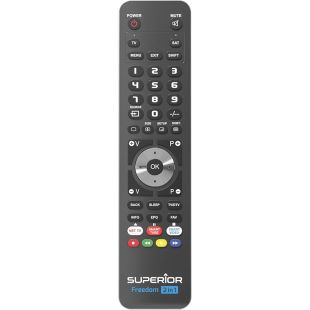
In particular, we want to underline the ease of programming a 2-in-1 remote control (the 4-in-1 is exactly the same) from the “Superior” range. In this remote control we will have all the controls that we had in our original remote control, if not, a map of button equivalences is shown during the configuration of the remote control.
What do we need to program our universal remote?
- A “Superior” 2-in-1 or 4-in-1 universal remote control
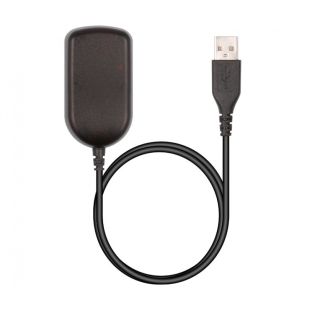
- A “Superior” Programming IR
- A Windows PC (we don't sell that)
How is our universal remote programmed?
To program our DTT universal remote we have to follow the following steps:
-
We connect the programming IR to the computer. This detects it directly and does not need to install any driver (valid for Windows).
-
Download the programming software from the web www.telecontrol.tv . This software is updated very periodically in order to have a large number of TV models, DTT receiver, satellite receiver, Bluerays, etc. Once downloaded, run the installer and install it on our computer.
-
Once installed, we will run the program and update the database. It is advisable to do it every time you ask us.
-
We have to detect the remote control that we are going to program, for this we confront the universal remote control with the programming IR with a separation of one centimeter.
-
When it detects the remote, we have to select the tab located in the upper left corner to assign a device to it. We look for the brand and model for the tdt universal remote that we want to program and double click on it. The assigned code will be copied under the tab on the left.
-
In the case of programming more than one device, we can do the same operation with the second tab from the left (there will be 4 tabs in the case of the 4-in-1 remote).
- Click with the mouse on the "Program" button making sure that the control is aligned and ready.
If you only want to acquire the remote control, in TDTprofessional we can program the remote control, for this you have to indicate in the field observations of the order the brand of the device (tv, tdt receiver, dvd, etc.) and the model that appears on a white sticker normally located on a non-visible part of the equipment.