





Great store. Will be my favorite in the future. Sent quickly. All items are brand new sealed. And the prices are very nice. Separately, I want to thank Álex Guerra, who controlled my order from start to finish. In general, you are great!!
Thank you for the service. Absolutely top
Great comms. Very helpful and reliable all along
Order placed packaged well, dispatch and delivered promptly Would use again. Thank you
42/5000 the best team, both human and technical
-
 Cómo detectar y cambiar un latiguillo de fibra óptica: caso práctico
Aprende a localizar un fallo en un latiguillo de fibra óptica, qué revisar antes de sustituirlo, cómo elegir el recambio y cómo comprobar que la instalación vuelve a funcionar.
-
 Cómo instalar una antena Dinova en una caravana o autocaravana paso a paso
Aprende a instalar una antena TDT Dinova en una caravana o autocaravana: material, soporte, alimentación, orientación, comprobaciones y errores frecuentes.
-
 Comelit Ultra: qué ofrece esta gama de videoporteros y cuándo elegirla
Descubre qué ofrece Comelit Ultra, qué módulos existen, en qué se diferencia de una solución básica y cuándo tiene sentido para una vivienda, comunidad o edificio.
-
 Mercusys: qué es, si es buena marca y qué solución WiFi elegir
Mercusys es una marca especializada en equipos de conectividad para hogares y pequeñas oficinas. Su catálogo incluye routers WiFi, repetidores, sistemas WiFi Mesh Halo, dispositivos 4G y 5G, adaptadores, soluciones Powerline y switches. La marca suele [...]
-
 Cómo conseguir mejor cobertura WiFi según tu casa, negocio o instalación
La mala cobertura WiFi no siempre significa lo mismo. En una vivienda puede aparecer en una habitación lejana, en una planta superior o en una zona con muchos obstáculos. En un negocio o una pequeña oficina, [...]
-
 Cómo configurar un TP-Link TL-WA854RE con el ordenador y sin WPS
Cuando un router no tiene botón WPS o la vinculación automática no funciona, todavía es posible configurar un repetidor WiFi desde el ordenador. Ese es precisamente el caso de muchos usuarios que buscan cómo poner en [...]
-
 Cómo instalar un repetidor WiFi paso a paso y qué comprobar después
Instalar un repetidor WiFi parece una tarea sencilla, pero buena parte de los problemas no aparecen en el momento de enchufarlo, sino después: cuando la cobertura apenas mejora, cuando el equipo se conecta pero la navegación [...]
-
 Guía de compra profesional: EAP615-WALL, EAP610EXT y EAP613
EAP615-WALL, EAP610EXT y EAP613: qué punto de acceso elegir según la instalación Cuando una instalación ya pide un punto de acceso más serio, la siguiente duda no suele ser si hace falta un equipo profesional, sino [...]
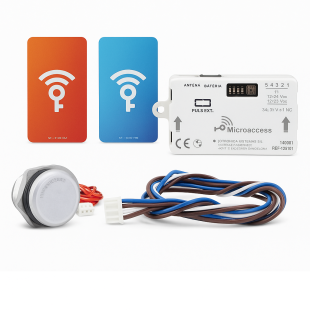
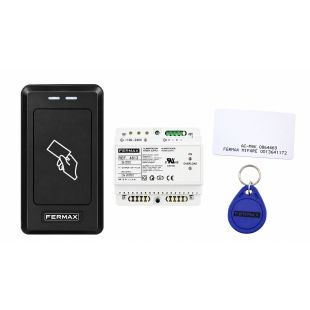
Access Control Kits
Access controls allow us to authorise certain people to access a door. This door will be of a house, a community of neighbours, a garden area, premises, in short, where we want to restrict entry to the public and authorise certain people. There are different types of access controls: With a numerical keypad with a password that can be unique for each person or shared. With a card reader, whose holder can enter, with remote control or by fingerprint which identifies the person unequivocally. Depending on the security required or the convenience of access control management, one method or the other is usually chosen.
One might think that access control is complex, but nothing could be further from the truth. In the end it all boils down to a method by which we activate a contact that opens a door. The way in which the contact is activated is what differentiates one access control from another.
We can classify access controls into three main groups:
- Stand-alone access controls. These allow control of a door or access. They are suitable for offices, offices, garages, etc. The SKYLINE series can be integrated into any SKYLINE door entry or video door entry panel.
Examples of stand-alone access controls:
-
With code: Memokey Keyboard, Memokey Mini Keyboard.
-
With card reader: Private Reader, Private Mini Reader.
-
Biometric (fingerprint reader): Biokey reader.
-
Radiofrequency (with remote control): Shop and garage kit.
- Distributed access controls. These are installations with several accesses that are not connected to each other. They are all managed from the same control post and do not require any type of remote connectivity as the identifiers are intelligent. Passes per user, expiry date, etc. are allowed.
An example of this type of control is the AXESKEY range of products from Fermax.
- Centralised access controls. These are installations with several accesses that require interconnection between them and a computer. They have advanced functions such as incident logs, event logs in real time or offline, time control, pedestrian-vehicular anti-passback, capacity limitation, device activation from readers, automation, etc.
Example of these centralised access controls:
- AC Plus range: the most competitive and simple to integrate solution. Suitable for a medium-sized access control network.
- IP Axes range: The most intuitive and competitive system for remote management via IP. Necessary if you require site mapping, functionalities such as counting hours per user, personnel present and access control in remote mode.
The most sold and most frequent access controls are the standalone ones. On our website you will find kits of all types of access controls. Both complete kits and individual parts. Please contact us if you have any questions, and especially for large and complex access control systems, please ask us for a quotation.