





Great store. Will be my favorite in the future. Sent quickly. All items are brand new sealed. And the prices are very nice. Separately, I want to thank Álex Guerra, who controlled my order from start to finish. In general, you are great!!
Thank you for the service. Absolutely top
Great comms. Very helpful and reliable all along
Order placed packaged well, dispatch and delivered promptly Would use again. Thank you
42/5000 the best team, both human and technical
-
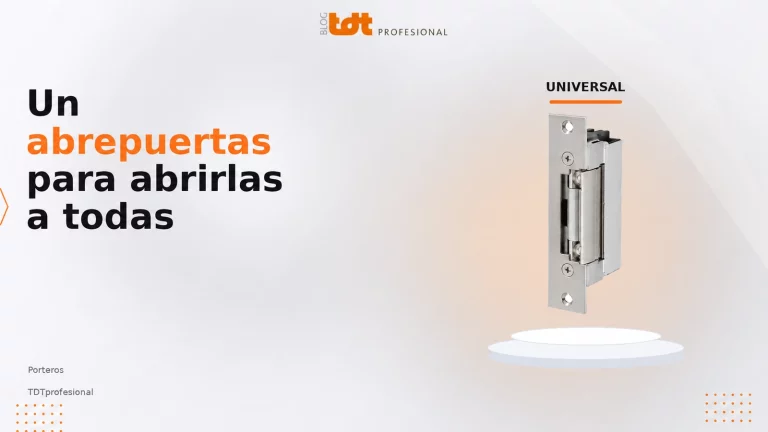 Abrepuertas universal para porteros y videoporteros: instalacion y guia tecnica
Qué es un abrepuertas universal para videoportero, cómo instalarlo y qué compatibilidades revisar antes de montarlo.
-
Problemas frecuentes con receptores TDT: sin señal, canales o mala imagen
Cuando un receptor TDT no encuentra canales, muestra “sin señal” o la imagen aparece pixelada, no siempre significa que el equipo esté averiado. Muchas veces el problema está en la antena, el cableado, la entrada seleccionada en el televisor o la configuración de búsqueda. Esta guía reúne los problemas más frecuentes con receptores TDT y […]
-
Cómo instalar un receptor satélite: antena, señal y configuración inicial
Instalar un receptor satélite requiere conectar correctamente la señal de la antena parabólica, unir el receptor al televisor y configurar los parámetros iniciales del equipo. Aunque el proceso puede ser sencillo cuando la instalación ya está preparada, conviene revisar cada paso para evitar errores de señal, imagen o búsqueda de canales. Esta guía explica la […]
-
Cómo instalar y configurar un receptor TDT paso a paso
Instalar un receptor TDT suele ser un proceso sencillo: conectar la antena, unir el receptor al televisor, encender el equipo y realizar la búsqueda de canales. Aun así, muchos problemas aparecen por usar una conexión incorrecta, no seleccionar bien la entrada del televisor o no revisar la señal de antena. En esta guía encontrarás los […]
-
Mejores receptores satélite calidad-precio: guía para elegir bien
Elegir un receptor satélite calidad-precio no consiste solo en buscar el modelo más barato. Un buen receptor debe ser compatible con tu instalación, ofrecer una experiencia estable, tener las conexiones que necesitas y contar con funciones útiles para el uso diario, como EPG, PVR, Timeshift o gestión de listas de canales. Esta guía te ayuda […]
-
Cómo elegir un receptor TDT: guía completa antes de comprar
Elegir un receptor TDT parece sencillo, pero no todos los decodificadores sirven para el mismo televisor, la misma instalación o el mismo tipo de usuario. Antes de comprar conviene revisar compatibilidad, conexiones, resolución, funciones de grabación y facilidad de uso. Esta guía te ayuda a ordenar los criterios más importantes para comprar un receptor TDT […]
-
Qué receptor comprar según tu caso: casa, bar, camping o segunda vivienda
No existe un único receptor ideal para todo el mundo. La mejor elección depende de dónde vas a usarlo, qué señal tienes disponible, qué televisor quieres conectar y qué funciones necesitas en el día a día. Un usuario que quiere recuperar una televisión antigua no necesita lo mismo que un bar, una segunda vivienda, una […]
-
Comparativa VIARK: LIL2 vs VIARK SAT vs VIARK SAT Dual
VIARK LIL2, VIARK SAT y VIARK SAT Dual responden a perfiles de usuario diferentes dentro de la misma familia de receptores satélite. La elección no depende solo del precio, sino de qué nivel de prestaciones necesitas, qué tipo de instalación tienes y si buscas un equipo compacto o una solución más completa. Esta comparativa está […]
UTP Cables: Safe and Stable Connections for Professional Networks
UTP (Unshielded Twisted Pair) cable, also known as Ethernet cable, network cable or RJ45 cable, is an essential component in any telecommunications installation. Its design, based on twisted pairs, allows data to be transmitted efficiently, minimizing electromagnetic interference and guaranteeing a stable connection.
In our online store you will find a wide selection of approved UTP cables, ideal for both domestic environments and professional installations that require secure, high-speed connections.
Looking for a resistant, high quality cable?
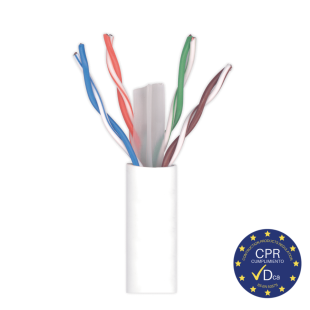
Discover our category 6 and higher cables, designed according to ICT2 standards and with Euroclass Dca classification to minimize fire risks.
What is a UTP Cable and How Does It Work?
UTP cable is a type of cable composed of pairs of copper wires twisted together. This twisting reduces external interference and improves signal quality during data transmission.
Common uses of UTP cable:
- Connection to routers, switches and PLCs.
- Closed-circuit television (CCTV) installations.
- Interconnection of video surveillance devices through baluns.
- Door entry and video door entry infrastructures with less than 8 wires.
- HDMI extenders to transmit video signal over long distances.
ICT Approved UTP Cable
According to ICT regulations, all telecommunications infrastructure must be composed of at least category 6 cables. The CPR requirements demand that the interior cabling must be Euroclass low fire risk: Class Dca or higher.
Generally cables are distinguished by categories, depending on the speed and frequency at which the cable is capable of transmitting. In the store we have ethernet cables from CAT5 and CAT6 onwards, the latter being twice as fast as the former.
When purchasing network cable, special care must be taken when choosing connectors. The connector and cable categories must match to ensure that there is no reduction in data transmission speed due to a bottleneck.
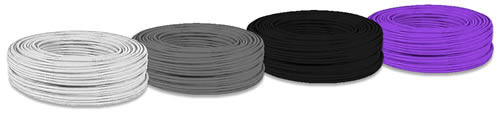
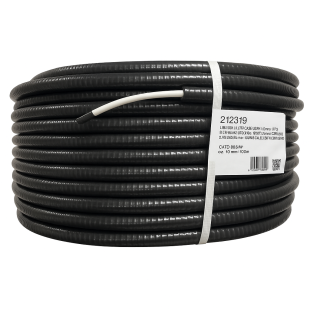
Normally gray sheathed cable is for indoor, black for outdoor, and violet or purple halogen-free. Due to the rise of rural internet installation companies, where it is generally necessary to make an outdoor installation, there is a demand for white outdoor UTP cable, which you can also find on our website.
We have UTP cable in reels of 100meters, 305meters, 500meters up to 1000meters. Some models can be ordered cut to length.
Frequently Asked Questions about UTP Cables
1. Can I use a CAT5e cable for a fiber optic network?
Yes, but it is not recommended. CAT5e cables support speeds of up to 1 Gbps, while fiber connections typically offer 300 Mbps, 600 Mbps or 1 Gbps. To take full advantage of the speed, opt for a CAT6 cable or higher.
2. What is the difference between UTP and FTP?
UTP (Unshielded Twisted Pair): Unshielded, ideal for low interference environments.
FTP (Foiled Twisted Pair): Includes a metal mesh that protects against electromagnetic interference, recommended for installations near industrial machinery.
3. Can I use UTP cable to install surveillance cameras?
Yes, provided that suitable baluns are used to convert analog signals into data compatible with the network cable.
Advantages of our UTP Cables
1. Reliable and stable transmission:
Ensures a loss-free and interference-free connection.
2. Compliance with ICT2 regulations:
Approved cables that comply with the requirement to use category 6 cable or higher.
3. Euroclass Dca:
Low flame spread and smoke emission, according to CPR (Construction Products Regulation).
4. Compatibility with modern devices:
Suitable for Gigabit Ethernet networks and indirect fiber optic connections.
5. Variety of colors and cover types:
Gray: Indoor installations.
Black: Outdoor installations (UV resistant).
Violet/Purple: Halogen-free, ideal for sensitive environments.
White: Outdoor use in rural internet installations.
6. Easy installation:
Flexible, lightweight cables, compatible with RJ45 connectors.
7. Available in different formats:
100 m, 305 m, 500 m and 1000 m reels.
Possibility of cut to size according to customer needs.
What Category of UTP Cable Do You Need?
UTP cables are classified into different categories according to their transmission capacity.
| Category | Maximum Speed | Bandwidth | Application |
| CAT5e | 1 Gbps | 100 MHz | Basic home networks |
| CAT6 | 1 Gbps (10 Gbps max. up to 55 m) | 250 MHz | Offices and professional networks |
| CAT6A | 10 Gbps | 500 MHz | Data centers and CCTV |
| CAT7 | 10 Gbps | 600 MHz | Critical facilities |
Recommendation: For current network projects, choose CAT6 or higher to ensure optimal performance.
Common UTP Cable Applications
-
Local Area Network (LAN) connections: Direct connection between computers, routers and switches.
- CCTV (Closed Circuit Television) installations:
- Video transmission through baluns.
- Common use in IP cameras and PoE (Power over Ethernet) systems.
- Door entry and video door entry systems:
- Analog 4+N systems use 5 wires, so a UTP cable with 4 pairs is an efficient option.
- Long distance HDMI transmission:
- Distances of up to 60 meters can be achieved using HDMI extenders over UTP cable.
- ICT telecommunication infrastructures:
- Projects in new buildings.
- Approved cables of category 6 and higher.
Why Choose Our UTP Cables
- High quality and guaranteed performance.
- Compliance with ICT2 standards.
- Wide variety of categories and formats.
- Fast delivery throughout Spain and internationally.
- Specialized technical advice.
- Any questions? Call us at +34 952 230 671