






Great store. Will be my favorite in the future. Sent quickly. All items are brand new sealed. And the prices are very nice. Separately, I want to thank Álex Guerra, who controlled my order from start to finish. In general, you are great!!
Thank you for the service. Absolutely top
Great comms. Very helpful and reliable all along
Order placed packaged well, dispatch and delivered promptly Would use again. Thank you
42/5000 the best team, both human and technical
-
 Cómo detectar y cambiar un latiguillo de fibra óptica: caso práctico
Aprende a localizar un fallo en un latiguillo de fibra óptica, qué revisar antes de sustituirlo, cómo elegir el recambio y cómo comprobar que la instalación vuelve a funcionar.
-
 Cómo instalar una antena Dinova en una caravana o autocaravana paso a paso
Aprende a instalar una antena TDT Dinova en una caravana o autocaravana: material, soporte, alimentación, orientación, comprobaciones y errores frecuentes.
-
 Comelit Ultra: qué ofrece esta gama de videoporteros y cuándo elegirla
Descubre qué ofrece Comelit Ultra, qué módulos existen, en qué se diferencia de una solución básica y cuándo tiene sentido para una vivienda, comunidad o edificio.
-
 Mercusys: qué es, si es buena marca y qué solución WiFi elegir
Mercusys es una marca especializada en equipos de conectividad para hogares y pequeñas oficinas. Su catálogo incluye routers WiFi, repetidores, sistemas WiFi Mesh Halo, dispositivos 4G y 5G, adaptadores, soluciones Powerline y switches. La marca suele [...]
-
 Cómo conseguir mejor cobertura WiFi según tu casa, negocio o instalación
La mala cobertura WiFi no siempre significa lo mismo. En una vivienda puede aparecer en una habitación lejana, en una planta superior o en una zona con muchos obstáculos. En un negocio o una pequeña oficina, [...]
-
 Cómo configurar un TP-Link TL-WA854RE con el ordenador y sin WPS
Cuando un router no tiene botón WPS o la vinculación automática no funciona, todavía es posible configurar un repetidor WiFi desde el ordenador. Ese es precisamente el caso de muchos usuarios que buscan cómo poner en [...]
-
 Cómo instalar un repetidor WiFi paso a paso y qué comprobar después
Instalar un repetidor WiFi parece una tarea sencilla, pero buena parte de los problemas no aparecen en el momento de enchufarlo, sino después: cuando la cobertura apenas mejora, cuando el equipo se conecta pero la navegación [...]
-
 Guía de compra profesional: EAP615-WALL, EAP610EXT y EAP613
EAP615-WALL, EAP610EXT y EAP613: qué punto de acceso elegir según la instalación Cuando una instalación ya pide un punto de acceso más serio, la siguiente duda no suele ser si hace falta un equipo profesional, sino [...]
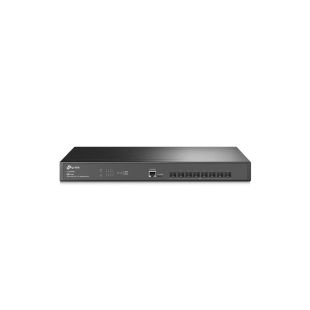
Network Switches for Homes, Businesses, and CCTV – Reliable Ethernet Distribution
As more devices demand direct internet access—computers, smart TVs, consoles, printers, IP cameras, IP intercoms, and home automation systems—a network switch becomes essential. It's the modern version of a power strip for your Ethernet network, distributing connectivity to multiple endpoints efficiently and securely.
What Is a Network Switch and Why Do You Need One?
A network switch is a device that distributes internet or local network connections to multiple devices. It is a key component in both home and business networks where multiple internet-enabled devices must operate simultaneously.
Benefits of Using a Switch in ICT and Smart Home Installations
In modern ICT (Infrastructure for Telecommunications) projects, passive multiplexers are being replaced by Ethernet switches. They not only split the connection but also enable internet distribution, which is crucial with today’s growing number of connected devices.
How Many Ports Do You Need? Choosing the Right Port Count
We offer switches with 4, 5, 8, 16, 24, and 48 ports. Keep in mind that one port is used for the uplink (network input), so select a model with enough ports for your TV, console, printer, IP camera, etc.
PoE and PoE+ Switches: Power Your Devices with Ethernet
Power over Ethernet (PoE) switches send electrical power through the same cable used for data. This is perfect for powering IP security cameras and other devices without needing separate power adapters.
PoE: up to 15.4W per port
PoE+: up to 30W per port
Ethernet Speed Explained: Fast Ethernet vs Gigabit
Switches range in speed from 10 Mbps to 100 Mbps (Fast Ethernet) and 1 Gbps (Gigabit Ethernet). For CAT6 installations, using Gigabit switches avoids bottlenecks and ensures fast, stable connections—especially important for gamers or office setups.
How to Choose the Best Network Switch for Home or Business
When buying a switch, consider the number of connected devices, need for PoE, and your internet plan's speed. For professional environments, Gigabit Ethernet is strongly recommended to avoid performance issues.
Plug & Play Switches for Hassle-Free Setup
Most of our switches are Plug & Play, meaning no configuration is needed. Just connect them to power and your internet line, and you're ready to distribute the network to all your devices instantly.
Best Switches for CCTV and IP Security Systems
For surveillance systems, PoE switches are a must. They let you power IP cameras over the same cable used for video and data, streamlining your installation and reducing clutter.
Top Brands: TP-Link, Hikvision, Mikrotik, Televes, and More
We carry switches from trusted brands like TP-Link, Fermax, Televes, Hikvision, Mikrotik, D-Link, Safire, TDTprofesional, GTlan, Reyee, and more—ensuring quality and compatibility for every type of setup.
Where to Buy Ethernet Switches with Fast Delivery and Great Prices
At TDT Profesional, you'll find a wide selection of switches ready for fast shipping. Whether you're building a smart home or upgrading your business network, we have what you need—at the right price.