




Great store. Will be my favorite in the future. Sent quickly. All items are brand new sealed. And the prices are very nice. Separately, I want to thank Álex Guerra, who controlled my order from start to finish. In general, you are great!!
Thank you for the service. Absolutely top
Great comms. Very helpful and reliable all along
Order placed packaged well, dispatch and delivered promptly Would use again. Thank you
42/5000 the best team, both human and technical
-
 Cómo detectar y cambiar un latiguillo de fibra óptica: caso práctico
Aprende a localizar un fallo en un latiguillo de fibra óptica, qué revisar antes de sustituirlo, cómo elegir el recambio y cómo comprobar que la instalación vuelve a funcionar.
-
 Cómo instalar una antena Dinova en una caravana o autocaravana paso a paso
Aprende a instalar una antena TDT Dinova en una caravana o autocaravana: material, soporte, alimentación, orientación, comprobaciones y errores frecuentes.
-
 Comelit Ultra: qué ofrece esta gama de videoporteros y cuándo elegirla
Descubre qué ofrece Comelit Ultra, qué módulos existen, en qué se diferencia de una solución básica y cuándo tiene sentido para una vivienda, comunidad o edificio.
-
 Mercusys: qué es, si es buena marca y qué solución WiFi elegir
Mercusys es una marca especializada en equipos de conectividad para hogares y pequeñas oficinas. Su catálogo incluye routers WiFi, repetidores, sistemas WiFi Mesh Halo, dispositivos 4G y 5G, adaptadores, soluciones Powerline y switches. La marca suele [...]
-
 Cómo conseguir mejor cobertura WiFi según tu casa, negocio o instalación
La mala cobertura WiFi no siempre significa lo mismo. En una vivienda puede aparecer en una habitación lejana, en una planta superior o en una zona con muchos obstáculos. En un negocio o una pequeña oficina, [...]
-
 Cómo configurar un TP-Link TL-WA854RE con el ordenador y sin WPS
Cuando un router no tiene botón WPS o la vinculación automática no funciona, todavía es posible configurar un repetidor WiFi desde el ordenador. Ese es precisamente el caso de muchos usuarios que buscan cómo poner en [...]
-
 Cómo instalar un repetidor WiFi paso a paso y qué comprobar después
Instalar un repetidor WiFi parece una tarea sencilla, pero buena parte de los problemas no aparecen en el momento de enchufarlo, sino después: cuando la cobertura apenas mejora, cuando el equipo se conecta pero la navegación [...]
-
 Guía de compra profesional: EAP615-WALL, EAP610EXT y EAP613
EAP615-WALL, EAP610EXT y EAP613: qué punto de acceso elegir según la instalación Cuando una instalación ya pide un punto de acceso más serio, la siguiente duda no suele ser si hace falta un equipo profesional, sino [...]
Structured Cabling (Data Cable)
Currently the network cable or structured cabling is the main means of data transmission, telephone and television. With the arrival of the new law of common telecommunications infrastructure ICT2, the telephone pair has been left aside to give way to fiber optics and network cable distribution. The ICT regulations require the use of CAT6 cables as a minimum.
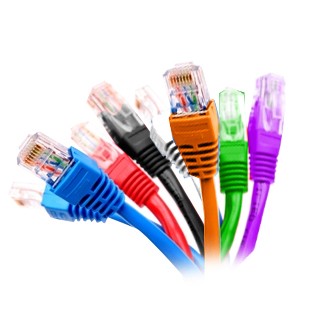
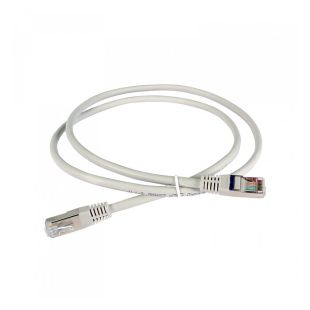
We have a wide range of data cables, also known as network cable, RJ45 cable or Ethernet cable. Depending on the shielding, we classify the cables as UTP, FTP or STP. We also have the necessary RJ45 connectors for cable terminations, and even RJ45 patch cords where the cable comes with the connectors already installed (preconnectorized), for when the distance is less than 20m.
Specific tools are usually needed to prepare the network cable with its connectors, unless they are self-crimpable.
Which Data Cable and RJ45 Connector to buy?
It is very important to choose a cable with the appropriate category for the installation. To do this we must know at what speed and frequency we want to transmit. We will need the connector category to be as fast as the cable, to make sure that part of the contracted speed is not lost along the way.
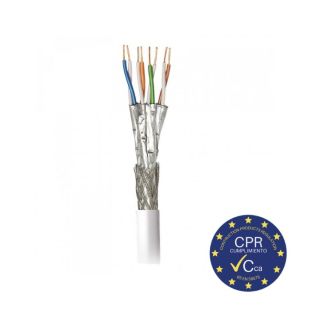
UTP, FTP, and STP refers to the shielding of the cable. Depending on the type of connection, distance, and importance of interferences, we will choose one or the other.
| Categories | ||||
| Category 5 | Category 5e | Category 6 | Category 6e | Category 7 |
| maximum speed of 100 Mbps with a bandwidth of 100 MHz | evolution of the previous one reaching up to 1000 Mbps | up to a maximum of 1 Gbps with a bandwidth of 250 MHz | evolution of the previous one that reaches up to 5 Gbps with a bandwidth of 500 MHz. | maximum speed of 10 Gbps with a bandwidth of 600 MHz |
| RJ45 Connector CAT5E | RJ45 Conector CAT6 | RJ45 Conector CAT6A | RJ45 Conector CAT7 | |
| Shielding | |||
| UTP | FTP | STP | S/FTP |
| unshielded | with global shielding for all pairs | with individual shielding for each of the pairs | with global and individual shielding |